

QuarkXpress Guidelines
Guidelines for Bleeds, Cut Lines, and Safety Margins
- Open QuarkXpress and create a new document (File > New > Project).
- Set the height and width 0.25 inches larger than the size of the finished printed piece. For example, if you’re using an 8.5 x 11 brochure template, make the dimensions 8.75 x 11.25 inches instead. A standard 2 x 3.5 inch business card would need to be 2.25 x 3.75 inches.
- Set all four margins to 0.
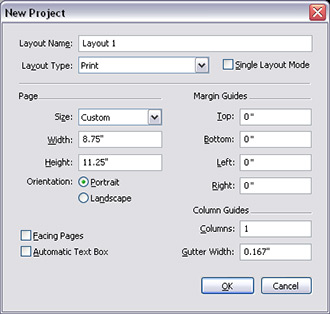
-
The 1/4 inch of extra space is intended for bleeds. Bleeds are text or images that extend all the way to the edge of the finished page. Since printing equipment can’t always accommodate printing all the way to the edge of the page, extra space must be added to allow for it. This excess space (1/8 inch on all sides) is then trimmed off once the printing process is complete. We recommend adding guides 1/8 inch from each edge of your document to indicate the cut line (the line where your document will be trimmed). The bleed area will fall outside this line (called the bleed line).